Since upgrading to iOS 7, my iPhone 5’s battery life has suffered. So I decided to poke around to see what I could do to help ensure I get the most from each charge. Here are some of the things I’ve learned, which were culled from Maclife.com.
Development
Flash File Uploader v3.3

For those of you using the [d]online Flash File Uploader, a recent blog comment requested that the output directory change the sort method to be alphabetical. The changes from version 3.2 are quite simple, particularly if you have a PHP guru like Mike working for you. Read more
ReadyBoost
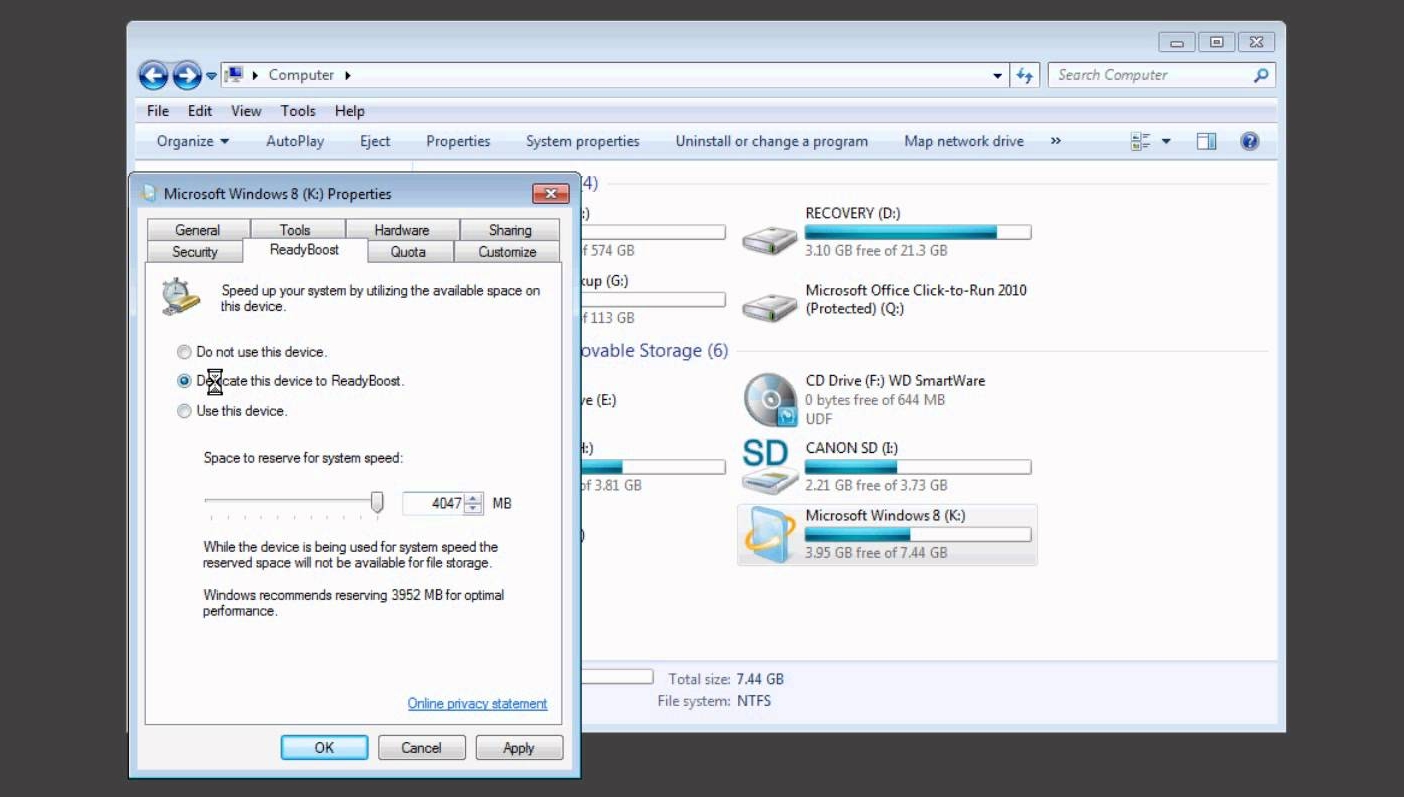
I was complaining to my brother about the speed of Adobe Photoshop on my Intel Dual 3.00GHz. Even with 4GB of RAM on a 64-bit OS, dragging multiple layers and manipulating complex filters lags, and even becomes unresponsive, reducing my productivity to a crawl on high-resolution images. That’s when he mentioned ReadyBoost. Read more
Diss ‘n’ Gauges
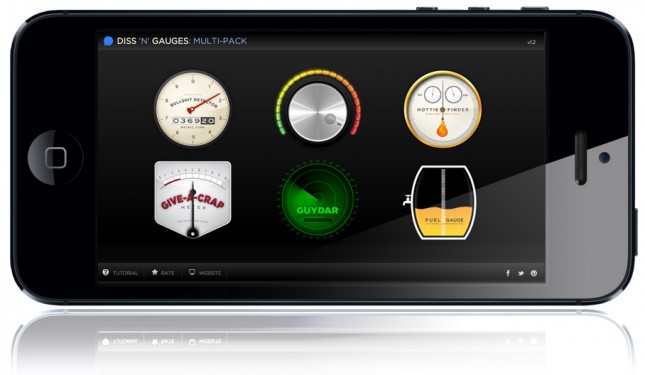
I’m pleased to announce my first application is ready for sale on Google Play and Apple App Store. You can also see the information about Diss ‘n’ Gauges in my company’s portfolio.
Diss ‘n’ Gauges: Sometimes the best response is an app!
Diss ‘n’ Gauges: Multi-Pack combines all our individual meters into one great application. Are you looking for best and funniest way to start or end (disengage from) a conversation?
The Multi-Pack includes:
- BS Detector: Is your friend talking out of their butt? Inform them (and the rest of your party) that you’re not buying it.
- Dial Down the B!tch: Is your friend acting nasty or spiteful and it’s exceeding your tolerance level? Inform them (and the rest of your party) that they need to dial it down a bit.
- Give-a-Crap Meter: Is your friend droning on and on about something that you couldn’t care less about (say, Crossfit, for instance)? Inform them (and the rest of your party) of your disinterest in a fun way.
- Hottie Finder: Looking for a great way to strike up a conversation with that beautiful girl or guy across the bar? Let our Hottie Finder act as a divining rod to direct you to them!
- Gaydar: Often find yourself in a dance club, at a karaoke hall, or on a cruise ship with no way to hone-in on the guys around you?
- Fuel Gauge: Need some help deciding if you need one more or had one too many? Here’s a quick, clever way to reply to friends when they ask if you’re ready for another round.
All meters react to tapping on the screen. Tap once to trigger, tap a second time to reset. Diss ‘n’ Gauges is now available for iOS (iPhone, iPad) and Android phones and tablets.
Mobile Websites vs. Applications

There’s no denying that mobile phones have grown to become an increasing part of our lives. In fact, there’s a 42% likelihood that you’re reading this newsletter on your phone or tablet device, up 10% from last March. And in most cases, mobile applications would probably be overkill for your business or brand, where a beautifully designed, responsive newsletter (such as this one) will more than suffice. However, if you’re looking for something more than emails, here are some things for you to consider.
There’s a big difference between a mobile website and a mobile application. Before you can evaluate the benefits of either, it’s important to understand the key differences between the two. Both apps and mobile websites are accessed on a handheld devices such as smartphones (e.g. iPhone, Android and Blackberry) and tablets.
Google Author Tag

Todd recently pointed me to the attention of Google’s new “author” tag, to help users read more articles by journalists and bloggers, and their new “publisher” tag, to help users find more articles by companies and organizations. Hopefully, within the next few months, you’ll be able to see my mug appearing by articles in Google search results pages, directing your attention to other articles I’ve written.
If you’re interested in learning more about author and publisher tags, read this article (and other information resources) on my design studio’s site: era404.com.
Twitter Cards
![[d]online - Twitter Card Example](https://don.citarella.net/wp-content/uploads/2013/02/donline-e1361234038628.jpg)
If you’re an avid user of Twitter, you’ve probably noticed the new links that show up on the bottom of certain tweets in your feed. The links say “View Summary” and allow you to read the title and excerpt of an article, along with a thumbnail of the article’s featured image. Those links are called Twitter Cards, come in three different varieties: summaries, photos, and play, and have two different layouts: web and mobile.
Twitter Cards help increase your visibility and ensourage users to click to your site by providing more information beyond Twitter’s 140 character limit. Furthermore, design and development studios with Twitter Card functionality built into their site can provide a working example for clients to see how the same functionality can be implemented into their sites.
As with most of Twitter’s APIs, Twitter cards are fairly quick to implement. All you need to do is insert some metadata, test, and apply to participate. To make things even easier, Niall Kennedy has created a WordPress plug-in to automatically scrape your post’s title, permalink, description and image URL for summary Twitter cards. After installing and activating the plug-in, preview your Twitter card by pasting the post’s URL into their preview page.Lastly, you’ll need to apply to participate. Simply enter your site and contact information here and Twitter will reply within 5-10 business days.