PANTONE® Moods Widget

Maybe you’ve noticed that colorful rotating widget to the left of this post (when this post was on the home page). That cool little plug-in was created for PANTONE® as part of our Facebook Moods project. The two panels show realtime Moods posted to Facebook, and a digest of the previous day’s most popular color, keyword and city. In terms of cities and their magnitude of Moods posted, by the way, São Paulo has got us beat by almost 400%:

Popular Locations/Colors

You can see all Pantone Moods trends by clicking here, after you’ve logged in to Facebook and approved the application. And, naturally, you can see your mood show up on the widget simply by posting a new one and waiting for the widget to cycle through the most recent 15 moods posted.

Anyway, I’m curious to hear what you think about the widget. Drop me a line or post a comment below.

Category: Web

Twitter Photo Filters

Twitter Photo Filters

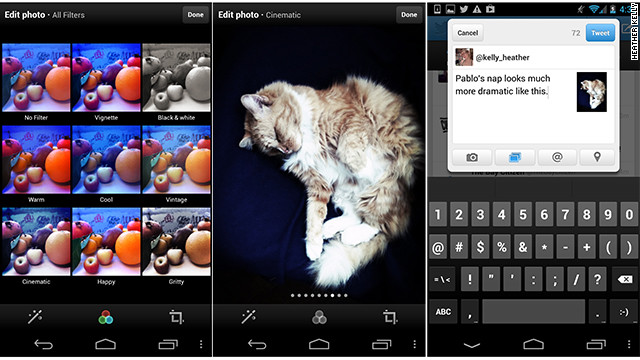
A day after confirming it had lost the ability to display Instagram images, Twitter has rolled out its own library of retro filters for its Android and iPhone apps.

The eight filters are the usual suspects we’ve come to expect from mobile photo apps, including desaturated, black and white and high contrast. There are auto-adjust and cropping options, as well as a helpful grid view that lets you see what each filter will look like at once.

“The latest versions of Twitter for iPhone and Twitter for Android introduce a few new ways to enhance the images you tweet,” said Twitter senior designer Coleen Baik in a blog post announcing the new features. She emphasized that images are important to Twitter users, and called photos “one of the most compelling forms of self-expression.”

The new filters were designed especially for Twitter by photo-editing service Aviary, which also handles edits for various partners such as Flickr and Twitpic. What the effects lack in originality, they will no doubt make up for in popularity. Filters are an easy alternative to tinkering with an image in a photo editor, and their retro aesthetic has helped Instagram get more than 150 million users.


Find My Face

Google has always had technology that’s been both cool and creepy at the same time. In fact, I believe their upcoming “Google Now” was criticized for this reason, precisely, and CNET has a great article showing how Google products go from creepy to cool.

Anyway, Google now has a “Find My Face” feature which scours the social networking world for recognizable faces and then emails you to let you know it found your face. Take a look at this email I just received:
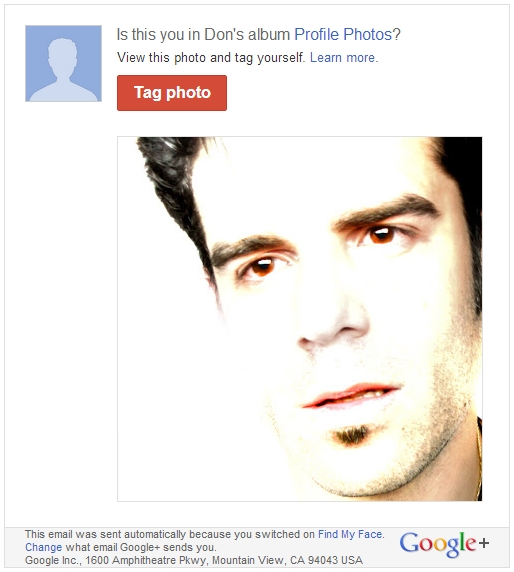
Here’s how Find my Face works:

After you turn on Find my Face, Google+ uses the photos you’re tagged in to create a model of your face. The model updates as tags of you are added or removed, and you can delete the entire face model at any time by turning off Find my Face.

If you turn on Find my Face, we can use your face model to make it easier to find photos of you. For example, we’ll show a suggestion to tag you when you or someone you know looks at a photo that matches your face model. Name tag suggestions by themselves do not change the sharing setting of photos or albums. However, when someone approves the suggestion to add a name tag, the photo and relevant album are shared with the person tagged.

As Zeh informed me, it’s fairly similar to what face.com used to do (before Facebook bought the Israeli facial recognition firm in June 2012) and Picasa and Facebook offer similar services. However, the idea that Googlebot is spidering the web with a model of my face, reporting back to me similarities is both creepy and cool. Creepy, because it brings to mind Sci-Fi movie gadgets where the government can spot your grainy likeness on any CCTV feed across the world. Cool, because it’ll help me to ensure no weirdo is montaging some shrine of my physiognomy somewhere in cyberspace, or some perverted derelict isn’t “catfishing” me by using my photos for a fictional online persona.


My Minority Report Interface is Coming…

Back in September 2005, I was interviewed by Communication Arts about our site, Who is Augustine, for Jonathan Safran Foer’s Everything is Illuminated. The final question of the interview was about my dream computer set-up, to which I promptly replied: “I’m looking into getting one of those translucent screens that Tom Cruise used in Minority Report. If anyone notices them on the market in the next century, please drop me a line.”

It looks like the software is coming from Leap Motion. Now I just need to speak with Paul Bettany about providing the automated voice for my Jarvis.


era404.com Reboot

era404 screenshot

I always say that the cobbler’s kids have the oldest shoes. The last relaunch of era404.com had been in 2005, before the widespread use of iOS devices (which don’t support Adobe Flash) and the release of browsers capable of supporting HTML5, CSS3 and JQuery.

For the last few years, as all designers seem to do, I kept saying “God, I really need to update our site.” As my brother Chris always says, “the second worst problem in the world is having too much work, but it’s far better than the alternative.” era404 has been fortunate in that we’ve never found ourselves with too much idle time on our hands. That said, we’ve been seriously lacking in the capacity to explore new business development and professional upkeep and maintenance on our public image. Until now. Read more

Google Latitude Location History

Google Latitude Location History

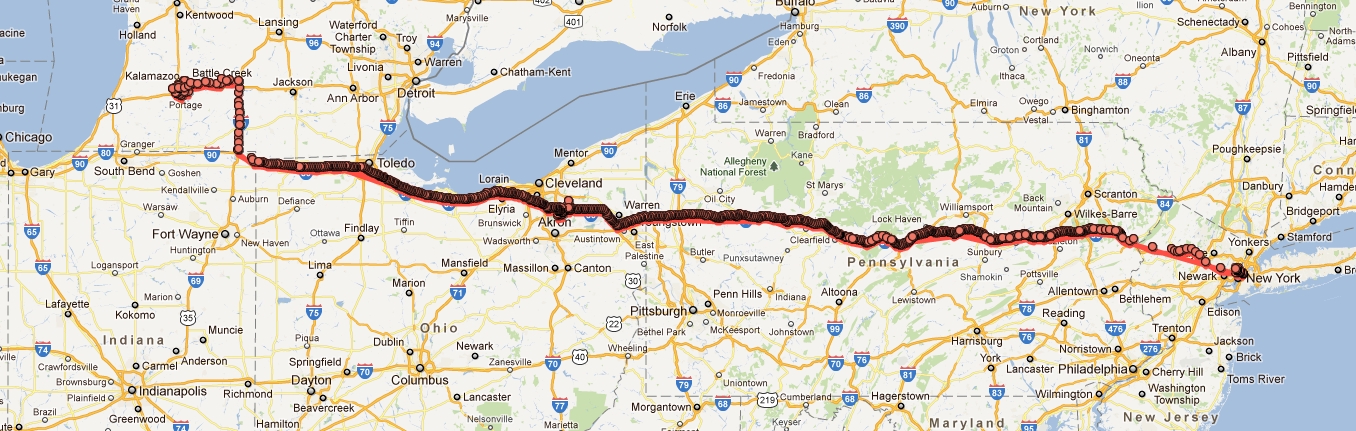
When I was a little kid, I always imagined that, after we die, we’d have the opportunity to visit a pavilion in heaven that traced a line through all our travels on earth. Google Latitude’s Location History can now do this, for one-month periods. It tracks your phone’s GPS signal along with stops along the way. And while this may be a little invasive from a Big Brother standpoint, it’s also quite helpful to notify friends and family of your impending arrival and track a missing or stolen cell phone to it’s current location.

Above, you can see a recent road trip to Michigan with a brief overnight stop in Ohio. The frequency of the dot seems fairly random but factors in speed, signal strength and delays. My five-hour traffic jam outside the Poconos is clearly present by a cluster of rather impatient looking dots. You can also see a kopse of dots denoting my meandering through Kalamazoo, my final destination. Keep in mind this journey retraces into itself for both legs of the trip. In this view, it’s difficult to tell which dot is for the westward vs. the eastward leg. Maybe the next version of Google Latitude Location History will overlay time.

Vincent Van Gogh’s Starry Night Interactive by Petros Vrellis

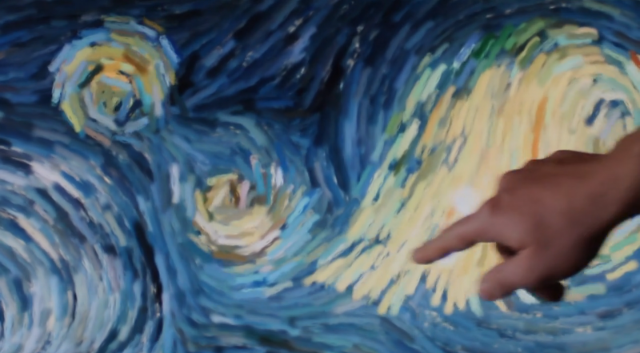
Petros Vrellis has created an interactive visualisation and synthesizer that animates Vincent Van Gogh’s “Starry Night”, using openframeworks to create a simple and elegant interaction. A fluid simulation gently creates a flowing fabric from Van Goghs impressionist portrait of the Milky Way and night sky over Saint-Rémy in France using the thick paint daubs as the particles within the fluid.

A touch interface allows a viewer to deform the image, altering both the flow of the particles and the synthesized sound, and then watch it slowly return to its original state. The sound itself is created using a MIDI interface to create a soft ambient tone out of the movement of the fluid that underscores the soft movement. Beauty through simplicity at its finest and most playful.

I’m a little embarrassed to admit that the video brought tears to my eyes.