Flash Video Smoothing

While working on a new project for ERA404, I received a great tip from Zeh, my Flash Obi Wan whom you’ve no doubt read me gushing about in the past. The site (which will be launched at the top of 2010) is centered around a video loop. The loop began as a 208MB raw Quicktime video clip shot by one of ERA404’s video directors/editors, Greg Stadnik (you may remember his work from our Beautiful Children viral video that was featured in Gawker and AdRants last year). The clip was then scaled in 1/2, compressed using the On2 VP6 codec, imported into flash and then manipulated manually.  The final SWF was 3.12MB, but the quality suffered terribly.

This is when Zeh clued me in to video smoothing. It’s the same principle as bitmap smoothing, since embedded video clips are technically just an image sequence. The result was night and day. The left half of the below screenshot shows video smoothing set to true, where the right shows smoothing set to false.
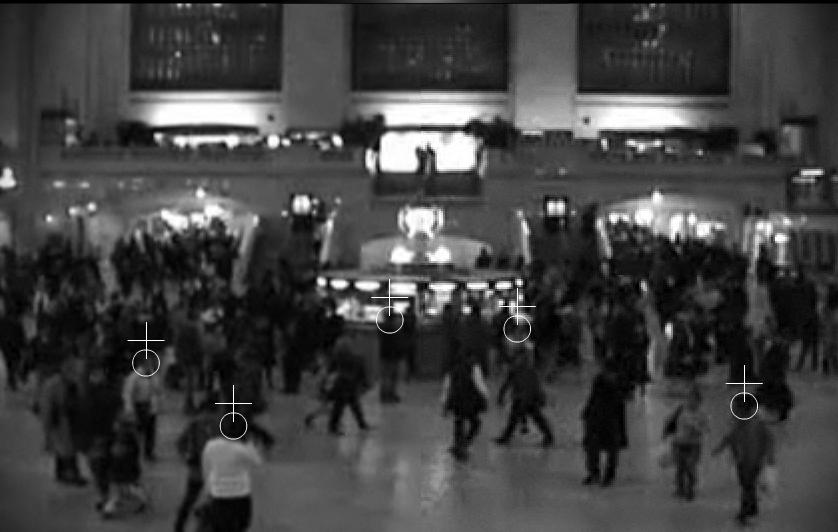
smoothingFigure 1. Video Smoothing – Click image for larger/detailed version

Note that this is just the beginning of this site with the radial gradient and scanlines stripped away to accentuate the smoothing detail. Overall, it’s an easy way to preserve quality without increasing loadtime, memory or processor demand. Give it a try. I’m sure you’ll be as pleasantly surprised as I was by the result.
myPANTONE for the iPhone

screenshot01

I don’t have an iPhone. And if you know anything about me, you probably know that I would never really want one. I’m on my phone too much as it is and can’t imagine creating a situation where I’d want to be on it more. I’m happy with my HTC TouchPro (though I wish it had a longer battery life) and find 99.9% of the applications that I’ve seen on the iPhone to be worthless; along with the animations, bells & whistles of the phone itself.

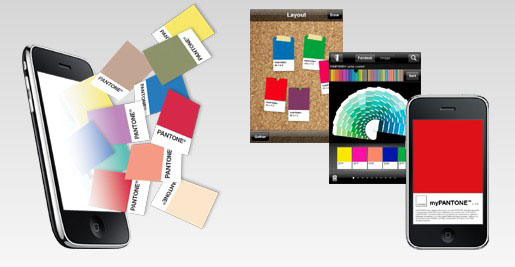
However, that said, I really find the myPANTONE app to be incredible. Take a look at this list of features:

Get your color inspiration and create your color scheme from these PANTONE color system libraries:

  • PANTONE MATCHING SYSTEM® (coated, uncoated and matte)
  • PANTONE Goe™ (coated and uncoated)
  • PANTONE Pastels (coated and uncoated)
  • PANTONE FASHION + HOME (paper and cotton)
  • Includes sRGB, HTML and L*a*b* for all colors

You can capture and extract colors from photos and snap to the closest PANTONE Color:

  • Images loaded on your iPhone
  • Directly from images taken by your iPhone camera

Automatically generates harmonious color combinations

Cross-reference PANTONE colors to other PANTONE color libraries

Once you have created your color palettes you can then share them in a variety of ways:

  • E-mail an HTML image of your palette
  • E-mail color palettes that can be used in the Adobe® Creative Suite® (.ase files), QuarkXPress® and CorelDraw®
  • Upload to the myPANTONE.com palette sharing web site

Other features include:

  • Text and voice annotation of palettes
  • Post notifications of new palettes to Twitter and Facebook
  • GPS tagging of palettes

There’s a video tour by Glenn Fleischman on YouTube and Pantone.com. And I imagine each new version will allow designers to perform more useful and intuitive tasks. And I’m not just saying this because we built the Facebook app, either.

The only other application that I would consider to be as helpful, if my meager testing of it proved it even worked, would be the What The Font app by MyFonts.com. I don’t know if it’s the iPhone’s crappy camera or the application’s poor calibration—the application on their site also seems lacking as of late—but I couldn’t get it to suggest fonts even mildly similar to the one I was seeking.

What is Google Chrome OS?

Telling the story of Google Chrome and how it inspired an operating system. Produced by Epipheo Studios.

BTW, I have Google Wave Preview and about a 1/2 dozen colleagues on it, yet, I still haven’t manage to catch someone online to play around with it. Will you add me so I can test with you?

ERA404 Launches “Eating Animals”

screenshot03

ERA404, who has worked with author, Jonathan Safran Foer, on The Project Museum (his personal site) and Who is Augustine? (the exploratory site for Everything is Illuminated) just launched the site for Foer’s much anticipated third book, Eating Animals (Little, Brown and Company, 11/2009). This book, though focused on the same audiences as his fiction, departs from his traditional work in that it is an exploration on his paternal concerns for meat consumption. Watch the trailer, learn about the book and author and interact in the Eating Animals forums.

Be careful, though. He has already converted Natalie Portman. You could be next…

Make any image into Google Maps, with UMapper

I’ve been following the success of UMapper (formerly GMap, provided by the good folks at AFComponents.com) since a client of mine asked ERA404 to build a dating search with results based on proximity around a geographic area. And while the site has taken a slightly different direction since then, UMapper piqued my interest. In their latest newsletter, they cited creating Google Maps-style widgets from any image. And sure enough, it works!

I started to think of all the useful applications this could have for my companies and clients. For instance, Lyrek CEMS, which manages our clients’ contacts, events and venues, could plot their contacts on a world map. Clients seeking geographic searches (such as the dating site, previously mentioned) could now brand and custom design their national or global maps. Game developers and Facebook Application developers could use this functionality for GeoDart Games and MapWikis. And who is to say that the map has to be a geographical representation of land? Any application where a user would want to plot points of interest/note on a 2D plane would work: It could be a hi-rez scan of an organ or anatomical figure for physician studies, or a zoomed micro electron slide of pond water for biological research. The possibilities are endless.

And with AFComponents/UMapper’s analytics tools, you can also create surveys, questionnaires, tests/quizzes, census studies and a whole host of other information-gathering applications.

Watch their video, here:

ERA404 Relaunches BroadwayVideo.com

broadwayvideo

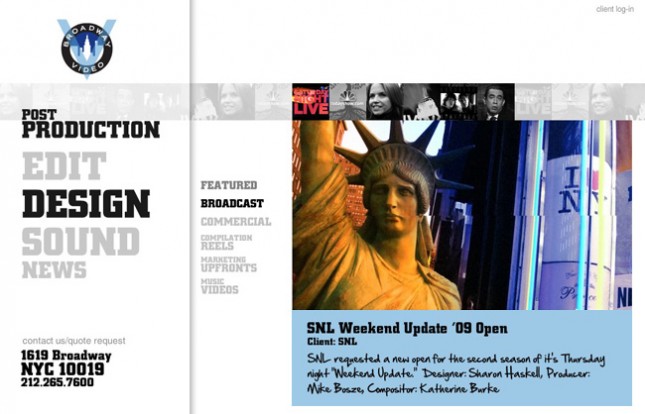
In 2005, Sharon Haskell contacted ERA404 to work with her on developing the portfolio site for Lorne Michaels‘ production company, Broadway Video. ERA404 previously worked with Ms. Haskell on the site for her motion, still-life and collage work, sharonhaskell.com. The site enjoyed four years of steady traffic until Broadway Video updated their branding and marketing campaign.

This is when Creative Director, Katherine Burke, returned to ERA404 to develop a new site that was in-line with the production facility’s new image. This morning, nearly four years to the day, the new site launched.

The site incorporates 80+ streaming videos in entirely dynamically loaded content, deep-linking through SWFAddress, daily news/press updates with advanced searching and RSS  feeds, archival footage and information about the production facility’s legacy over the last 35 years.

Visit BroadwayVideo.com